How to define a new Protocol
The gufe Protocol system is designed as an extensible point of the library, allowing developers to write their own methods for performing calculations in a form that can take full advantage of the OpenFE ecosystem.
Our recommendation in this how-to is to start simple;
we will call out areas where you can iterate further on making your Protocol more sophisticated.
If you want a complete, runnable example to start building your own Protocol from, skip here: Putting it all together: A complete example
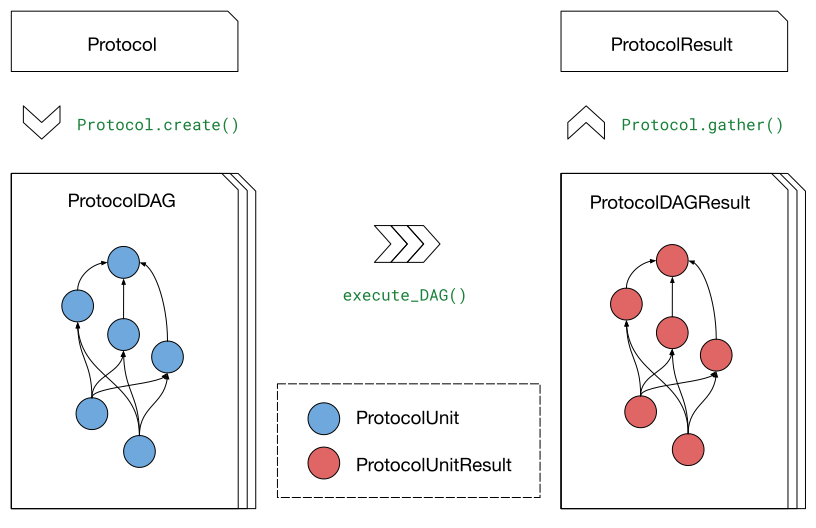
Overview: What makes a Protocol
A complete Protocol implementation requires the following interconnected components:
Protocol class: The main class that creates computational workflows
Settings class: A Pydantic model defining configuration parameters
ProtocolUnit classes: Individual computational steps in the workflow
ProtocolResult class: Container for aggregated results from multiple runs
The Protocol creates a ProtocolDAG (directed acyclic graph) of ProtocolUnit objects that define the computational workflow.
Multiple ProtocolDAG executions can be aggregated into a single ProtocolResult to provide statistical estimates.
If this is your first time writing a Protocol, we recommend defining these components in the following step order.
You can of course iterate on these components as you write each one, improving the implementation as you go.
Step 1: Define your Settings
First, create a settings class that inherits from Settings.
This defines all the configuration parameters your protocol needs:
from pydantic import InstanceOf

from gufe.settings import Settings, SettingsBaseModel
from gufe.settings.typing import NanosecondQuantity


class SimulationSettings(SettingsBaseModel):
    """Settings for simulation control, including lengths, etc...

    """
    minimization_steps: int = 5000
    """Number of minimization steps to perform. Default 5000."""

    equilibration_length: NanosecondQuantity
    """Length of the equilibration phase in units of time."""

    production_length: NanosecondQuantity
    """Length of the production phase in units of time."""


class AlchemicalSettings(SettingsBaseModel):
    """Settings specific to the particulars of this alchemical method.

    """
    ...


class MyProtocolSettings(Settings):
    """Settings for an example Protocol.

    """
    # the number of lambda windows to perform
    n_lambdas: int = 5

    simulation_settings: SimulationSettings
    alchemical_settings: AlchemicalSettings

    # by subclassing from ``Settings``, we also get:
    # - forcefield_settings : parameters for force field choices
    # - thermo_settings : thermodynamics parameters, e.g. pressure, temperature
Some notes on the above:
gufe includes several
GufeQuantitytypes, including theNanosecondQuantityused above. We recommend using these for settings fields that carry units, and you can easily make your own if necessary by following the pattern in thegufe.settings.typingmodule.We defined a couple
SettingsBaseModelsubclasses to group together related settings, such as the number of steps to use for various portions of the simulation inSimulationSettings. It is common practice to break aProtocolSettingsobject up in this way to make them more modular and easier to work with.- Our
SettingssubclassMyProtocolSettingswill then feature a hierarchy of settings: simulation_settings:alchemical_settingsforcefield_settingsthermo_settings
- Our
Step 2: Define your ProtocolResult
Create a ProtocolResult subclass that defines how to compute estimates and uncertainties from your Protocol’s outputs:
from gufe import ProtocolResult
from openff.units import unit
import numpy as np

class MyProtocolResult(ProtocolResult):

    # required method
    # return ``None`` if Protocol doesn't produce an estimate
    def get_estimate(self) -> unit.Quantity:
        """Calculate the free energy estimate from all runs."""
        # extract the key results from all completed runs
        free_energies = self.data["free_energies"]

        # get unit of the first value
        u = free_energies[0].u

        # return the mean as our best estimate, converting to same units
        return np.mean(np.asarray([dG.to(u).m for dG in free_energies])) * u

    # required method
    # return ``None`` if Protocol doesn't produce an estimate
    def get_uncertainty(self) -> unit.Quantity:
        """Calculate the uncertainty from all runs."""
        free_energies = self.data["free_energies"]

        # get unit of the first value
        u = free_energies[0].u

        # return the standard error as our uncertainty, converting to the same units
        std_dev = np.std(np.asarray([dG.to(u).m for dG in free_energies])) * u
        std_err = std_dev / np.sqrt(len(free_energies))
        return std_err
It’s okay for the implementations of these methods to be a guess for now.
We will define how the contents of MyProtocolResult.data are assembled in Step 4: Implement your Protocol class.
Some additional notes:
The example above returns a single estimate by taking the sample mean of the individual ProtocolDAGResult estimates, and reports the uncertainty in that single estimate as the standard error. This is not the only choice available. Some
Protocols choose to report their uncertainty as the standard deviation. OtherProtocols don’t report the estimate as a sample mean at all, instead aggregating trajectories of reduced potentials or nonequilibrium works and deriving a single estimate from these using estimators such as BAR or MBAR. The choice is yours as to what is most appropriate for yourProtocol.Although less common, you can also write
Protocols for NonTransformations. These operate on a single ChemicalSystem, and typically perform some form of sampling, such as equilibrium molecular dynamics. In this case, theget_estimate()andget_uncertainty()methods typically lack meaning, and can be writtent to returnNone. It may make sense to create other methods returning quantities of interest from this sampling, however.
Step 3: Define your ProtocolUnits
Create the ProtocolUnits that will perform the actual work.
These should inherit from ProtocolUnit and implement an _execute method:
Important
Use ctx.shared for large objects that need to be passed between units.
This avoids serialization issues and improves performance by keeping file paths in the return objects instead of the large objects themselves.
from gufe import ProtocolUnit, Context

class SetupUnit(ProtocolUnit):
    """Prepare the system for simulation."""

    @staticmethod
    def _execute(ctx: Context, *, stateA, stateB, mapping, settings, **inputs):
        """Set up the alchemical system."""
        import pickle

        # ctx provides scratch and shared directories
        # Use ctx.shared to write files that other units will need
        shared_dir = ctx.shared

        # Use ctx.scratch to write temporary files needed only within this unit
        # These files will typically be deleted by the execution engine
        # upon unit completion
        scratch_dir = ctx.scratch

        # As an example, your setup logic here...
        # - Create alchemical system from stateA/stateB
        # - Apply the atom mapping
        # - Set up force field parameters
        prepared_system = ...  # Your setup code here
        topology = ...         # Your topology creation
        coordinates = ...      # Your coordinate preparation

        # Write large objects to shared directory instead of returning them
        system_file = shared_dir / "system.pkl"
        topology_file = shared_dir / "topology.pkl"
        coords_file = shared_dir / "initial_coords.pkl"

        with open(system_file, 'wb') as f:
            pickle.dump(prepared_system, f)
        with open(topology_file, 'wb') as f:
            pickle.dump(topology, f)
        with open(coords_file, 'wb') as f:
            pickle.dump(coordinates, f)

        # This dict will form the output content of the corresponding ProtocolUnitResult
        return {
            "system_file": str(system_file),
            "topology_file": str(topology_file),
            "initial_coordinates_file": str(coords_file),
            "log": "System setup completed"
        }

class SimulationUnit(ProtocolUnit):
    """Run an individual simulation."""

    def _execute(self, ctx: Context, *, setup_result, lambda_window, settings, **inputs):
        """Execute a single alchemical window simulation."""
        import pickle

        # Load large objects from files written by setup unit
        with open(setup_result.outputs["system_file"], 'rb') as f:
            system = pickle.load(f)
        with open(setup_result.outputs["topology_file"], 'rb') as f:
            topology = pickle.load(f)
        with open(setup_result.outputs["initial_coordinates_file"], 'rb') as f:
            coordinates = pickle.load(f)

        # use the built-in logger for the ProtocolUnit where desired to give visibility
        # on runtime behavior, help debug issues, etc.
        self.logger.info("Simulation start...")

        # Your simulation logic here...
        # - Run minimization for `settings.simulation_settings.minimization_steps`
        # - Run equilibration for `settings.simulation_settings.equilibration_length`
        # - Run production simulation for `settings.simulation_settings.simulation_length`
        # - Gather reduced potentials `u_nk` from sampling;
        #   see also: https://alchemlyb.readthedocs.io/en/latest/parsing.html#u-nk-standard-form
        u_nk = ...             # trajectory of `u_nk`
        final_coords = ...     # final coordinates

        self.logger.info("Simulation complete.")

        # Write output files to shared directory
        u_nk_file = ctx.shared / f"u_nk{lambda_window}.pkl"
        final_coords_file = ctx.shared / f"final_coords_window_{lambda_window}.pkl"

        with open(final_coords_file, 'wb') as f:
            pickle.dump(final_coords, f)

        # This dict will form the output content of the corresponding ProtocolUnitResult
        return {
            "u_nk": u_nk,
            "final_coordinates_file": str(final_coords_file),
            "lambda_window": lambda_window,
        }

class AnalysisUnit(ProtocolUnit):
    """Analyze results from all simulations."""

    @staticmethod
    def _execute(ctx: Context, *, simulation_results, settings, **inputs):
        """Combine results from all simulation windows."""
        import pickle
        from alchemlyb.estimators import MBAR

        # simulation_results will be a list of ProtocolUnitResult objects
        u_nks = []
        final_coords = {}

        for sim_result in simulation_results:
            # Extract numerical results directly
            u_nks.append(sim_result.outputs["u_nk"]

            # Load coordinate files if needed for analysis
            lambda_window = sim_result.outputs["lambda_window"]
            coords_file = sim_result.outputs["final_coordinates_file"]
            with open(coords_file, 'rb') as f:
                coords = pickle.load(f)

            final_coords[lambda_window] = coords

        # get a free energy estimate with MBAR
        u_nk_all = pd.concat(u_nks)
        mbar = MBAR()
        mbar.fit(u_nk_all)

        total_free_energy = mbar.delta_f_.loc[0.0, 1.0]
        total_free_energy_uncertainty = mbar.d_delta_f_.loc[0.0, 1.0]

        # Perform any other analysis of e.g. final coordinates
        # ...

        # This dict will form the output content of the corresponding ProtocolUnitResult
        return {
            "total_free_energy": total_free_energy,
            "total_free_energy_uncertainty": total_free_energy_uncertainty,
            ...
        }
Some notes on the above:
The inputs for a ProtocolUnit
_executemethod must start with theContextobject, which provides theProtocolUnitwith appropriatesharedandscratchdirectories, as well as directories for depositingstderrandstdoutas desired for subprocess calls. The execution engine populates thisContextobject before running theProtocolUnit.Every input following
Contextcan be whatever theProtocolUnitneeds as inputs, with the constraint that each element be serializable bygufe. See Serialization constraints and methods in gufe for the types supported.dicts andlists with elements of these types are also allowed to arbitrary depth.When an input is another
ProtocolUnit(possibly nested inlists and/ordicts), as insimulation_resultsinAnalysisUnitabove, theProtocolUnitis converted to its corresponding ProtocolUnitResult by the execution engine before being fed to the_executemethod. This occurs as the execution engine walks the ProtocolDAG in topological order.When a
ProtocolUnit’s_executemethod completes, the content of the returneddictbecomes theoutputsattribute of the corresponding ProtocolUnitResult.You can use the
ProtocolUnit’sloggerproperty to write log messages to its own log stream. The execution engine performing theProtocolUnitmay then preserve these so they can be introspected later.
Step 4: Implement your Protocol class
Now create your custom Protocol class that inherits from Protocol.
This ties together the Settings, ProtocolResult, and ProtocolUnits we created above:
import numpy as np
from gufe import Protocol, ChemicalSystem, ComponentMapping, ProtocolDAGResult, ProtocolUnit
from typing import Optional, Union, List, Iterable, Any

class MyProtocol(Protocol):
    # Required class attributes
    result_cls = MyProtocolResult
    _settings_cls = MyProtocolSettings

    @classmethod
    def _default_settings(cls) -> MyProtocolSettings:
        """Provide sensible default settings."""
        from gufe.settings import OpenMMSystemGeneratorFFSettings, ThermoSettings

        return MyProtocolSettings(
            n_lambdas=5,
            simulation_settings=SimulationSettings(
                equilibration_length=1.0 * unit.nanosecond,
                production_length=10.0 * unit.nanosecond
            ),
            alchemical_settings=AlchemicalSettings(),
            forcefield_settings=OpenMMSystemGeneratorFFSettings(),
            thermo_settings=ThermoSettings(
                temperature=300 * unit.kelvin, pressure=1 * unit.bar
            ),
        )

    def _create(
        self,
        stateA: ChemicalSystem,
        stateB: ChemicalSystem,
        mapping: Union[ComponentMapping, List[ComponentMapping]] | None = None,
        extends: ProtocolDAGResult | None = None,
    ) -> List[ProtocolUnit]:
        """Create DAG of ProtocolUnits performing the Protocol."""

        # Handle extension from previous results if needed
        if extends is not None:
            # Extract useful information from the previous run
            # This might be final coordinates, equilibrated structures, etc.
            # e.g.
            starting_point = extends.protocol_unit_results[-1].outputs
        else:
            starting_point = None

        # Create the setup unit
        setup = SetupUnit(
            name="system_setup",
            stateA=stateA,
            stateB=stateB,
            mapping=mapping,
            settings=self.settings,
            starting_point=starting_point
        )

        # Create multiple independent simulation units,
        # one for each lambda window
        simulations = []
        for i in np.linspace(0, 1, self.settings.n_lambdas):
            sim_unit = SimulationUnit(
                name=f"simulation_lambda_{i}",
                setup_result=setup,  # this creates dependency on SetupUnit
                lambda_window=i,
                settings=self.settings
            )
            simulations.append(sim_unit)

        # Create analysis unit that depends on all simulations
        analysis = AnalysisUnit(
            name="final_analysis",
            simulation_results=simulations,  # depends on all simulations
            settings=self.settings
        )

        # Return all units - dependencies are implicit from constructor args
        return [setup, *simulations, analysis]

    def _gather(self, protocol_dag_results: Iterable[ProtocolDAGResult]) -> dict[str, Any]:
        """Aggregate results from multiple ProtocolDAG executions."""
        # This method combines results from multiple independent protocol runs
        # into data that the ProtocolResult can use to compute estimates

        free_energies = []
        free_energy_uncertainties = []

        for dag_result in protocol_dag_results:
            # Find the terminal (final) unit results
            for unit_result in dag_result.terminal_protocol_unit_results:
                if unit_result.name == "final_analysis":
                    free_energies.append(
                        unit_result.outputs["total_free_energy"]
                    )
                    free_energy_uncertainties.append(
                        unit_result.outputs["total_free_energy_uncertainty"]
                    )

        return {
            "free_energies": free_energies,
            "free_energy_uncertainties": free_energy_uncertainties,
        }
Step 5: Add validation (optional)
You can add custom validation to check that inputs are compatible with your Protocol.
This may be called by execution engines prior to calling the _create method as a way to fail quickly.
class MyProtocol(Protocol):
    # ... other methods ...

    def _validate(
        self,
        *,
        stateA: ChemicalSystem,
        stateB: ChemicalSystem,
        mapping: Optional[Union[ComponentMapping, List[ComponentMapping]]] = None,
        extends: Optional[ProtocolDAGResult] = None
    ):
        """Validate inputs for this protocol."""
        from gufe.protocols.errors import ProtocolValidationError

        # check ``Protocol._default_validate`` for the types of validations
        # done for all Protocols

        # add your own that are specific to your custom Protocol here
Understanding ProtocolUnit dependencies
Dependencies between ProtocolUnit objects are established implicitly by passing one unit as a constructor argument to another:
# setup runs first (no dependencies)
setup = SetupUnit(name="setup", ...)

# simulation depends on setup (setup passed as argument)
simulation = SimulationUnit(name="sim", setup_result=setup, ...)

# analysis depends on simulation (simulation passed as argument)
analysis = AnalysisUnit(name="analysis", simulation_results=[simulation], ...)
ProtocolUnit objects can also be nested in dictionaries and lists, and dependencies will still be detected:
# Dependencies work when units are in lists
simulations = [sim1, sim2, sim3]
analysis = AnalysisUnit(name="analysis", simulations=simulations, ...)

# Dependencies work when units are in dictionaries
unit_dict = {"equilibration": eq_unit, "production": prod_unit}
final_unit = FinalUnit(name="final", inputs=unit_dict, ...)
The ProtocolDAG automatically determines the execution order from these dependencies.
Units with no dependencies run first, followed by units whose dependencies have completed.
Putting it all together: A complete example
Here’s a simplified but complete Protocol implementation:
from gufe import Protocol, ProtocolUnit, ProtocolResult
from gufe.settings import Settings
from openff.units import unit
from typing import Iterable, Any, List
import numpy as np

# Settings
class SimpleProtocolSettings(Settings):
    n_repeats: int = 3

# Result
class SimpleProtocolResult(ProtocolResult):
    def get_estimate(self):
        return np.mean(self.data["values"]) * unit.kilocalorie_per_mole

    def get_uncertainty(self):
        values = self.data["values"]
        if len(values) < 2:
            return 0.0 * unit.kilocalorie_per_mole
        return np.std(values) / np.sqrt(len(values)) * unit.kilocalorie_per_mole

# Units
class SimpleUnit(ProtocolUnit):
    @staticmethod
    def _execute(ctx, **inputs):
        # Simulate a calculation that returns a random result
        result = np.random.normal(5.0, 1.0)  # Mean=5, std=1
        return {"result": result}

# Protocol
class SimpleProtocol(Protocol):
    result_cls = SimpleProtocolResult
    _settings_cls = SimpleProtocolSettings

    @classmethod
    def _default_settings(cls):
        return SimpleProtocolSettings(n_repeats=3)

    def _create(self, stateA, stateB, mapping=None, extends=None) -> List[ProtocolUnit]:
        # Create n_repeats independent units
        units = [
            SimpleUnit(name=f"calc_{i}", replica=i, settings=self.settings)
            for i in range(self.settings.n_repeats)
        ]
        return units

    def _gather(self, protocol_dag_results: Iterable[ProtocolDAGResult]) -> dict[str, Any]:
        values = []
        for dag_result in protocol_dag_results:
            for unit_result in dag_result.protocol_unit_results:
                values.append(unit_result.outputs["result"])
        return {"values": values}
Using your Protocol
Once implemented, your protocol can be used like any other gufe protocol:
# Get default settings, modify as needed
settings = MyProtocol.default_settings()
settings.n_lambdas = 10
settings.simulation_settings.production_length = 20.0 * unit.nanosecond

# Create Protocol instance with custom settings
protocol = MyProtocol(settings)

# Create a ProtocolDAG for specific chemical systems
dag = protocol.create(
    stateA=chem_system_a,
    stateB=chem_system_b,
    mapping=atom_mapping
)

# Execute on a scheduler (not shown)
# dag_result = scheduler.execute(dag)

# Gather multiple results into final estimate
# final_result = protocol.gather([dag_result1, dag_result2, ...])
Logging in Protocols
Both Protocol and ProtocolUnit objects inherit from GufeTokenizable and therefore have access to the logger property.
This logging mechanism is essential for debugging, monitoring execution progress, and understanding what happened during a calculation.
Using the Logger in ProtocolUnits
When writing your ProtocolUnit._execute methods, use self.logger to record important events:
class SimulationUnit(ProtocolUnit):
    @staticmethod
    def _execute(ctx: Context, **inputs):
        # Note: in static methods, you can't use self.logger
        # You'll need to make the method non-static or use a workaround
        pass

# Better pattern - use instance method if you need logging
class SimulationUnit(ProtocolUnit):
    def _execute(self, ctx: Context, **inputs):
        self.logger.info("Starting simulation")
        self.logger.debug(f"Lambda window: {inputs['lambda_window']}")

        # Your simulation code here
        try:
            result = run_simulation(...)
            self.logger.info("Simulation completed successfully")
        except Exception as e:
            self.logger.error(f"Simulation failed: {e}")
            raise

        return {"result": result}
Choosing Appropriate Log Levels
Use standard Python logging levels to categorize your messages:
DEBUG: Detailed diagnostic information useful during development (parameter values, intermediate results, loop iterations)
INFO: General progress updates that confirm things are working as expected (simulation started, finished, checkpoints reached)
WARNING: Something unexpected happened but execution can continue (using default values, recovering from errors)
ERROR: A serious problem that prevents a specific operation from completing
CRITICAL: A very serious error that may prevent the entire protocol from completing
def _execute(self, ctx: Context, **inputs):
    self.logger.debug(f"Input parameters: {inputs}")

    self.logger.info("Running equilibration")
    equilibration_result = equilibrate(...)

    if equilibration_result.converged:
        self.logger.info("Equilibration converged")
    else:
        self.logger.warning("Equilibration did not fully converge, proceeding anyway")

    self.logger.info("Running production simulation")
    # ... production run ...
Don’t Check Verbosity - Let Logging Handle It
Important: Do not implement your own verbosity checking in protocol code. The execution engine or user will configure the logging level at runtime:
# Good - just log at the appropriate level
def _execute(self, ctx: Context, **inputs):
    self.logger.debug("Detailed parameter information")
    self.logger.info("Simulation progress update")

# Bad - don't do this
def _execute(self, ctx: Context, *, verbose=False, **inputs):
    if verbose:
        self.logger.info("Simulation progress update")
This approach separates concerns: protocol authors focus on what to log, while users and execution engines control which messages to show.
Logging Configuration for Protocol Users
When running a protocol, configure logging to control what gets displayed:
import logging
import time

# Configure the root gufe logger
logger = logging.getLogger('gufekey')

# Create a formatter that includes the GufeKey
formatter = logging.Formatter(
    "[%(asctime)s] [%(gufekey)s] [%(levelname)s] %(message)s"
)
formatter.converter = time.gmtime

# Set up the handler
handler = logging.StreamHandler()
handler.setFormatter(formatter)
logger.addHandler(handler)

# Set level to control verbosity
logger.setLevel(logging.INFO)  # Shows INFO and above
# logger.setLevel(logging.DEBUG)  # Shows everything

# Now execute your protocol
dag = protocol.create(stateA, stateB, mapping)
# Execution engine runs the DAG and logs are captured
For more details on the logging system, see Logging in GufeTokenizables.
Best practices and tips
Start simple: Begin with a minimal working implementation and add complexity gradually.
Handle errors gracefully: Use
try/exceptin_executemethods and return meaningful error information. This will help with introspection of the ProtocolUnitFailure resulting from an exception raised by the ProtocolUnit.Use the context effectively: The
ctxparameter providesscratch(temporary, persists over execution of a singleProtocolUnit) andshared(persists over execution of theProtocolDAG) directories. Usectx.sharedfor large objects that need to pass between units; store file paths in returndicts, not the objects themselves.Test thoroughly: Write unit tests for your
ProtocolUnitclasses early in development.Document your settings: Use Pydantic’s Field() function with descriptions to document what each setting does, or use docstring conventions for each of the settings.
Consider serialization: All your classes should be serializable - avoid complex objects that can’t be serialized with
GufeTokenizable.to_json.Resource management: Clean up temporary files in your
_executemethods when possible.Validate early: Implement
_validateto catch configuration problems before expensive computations begin.Log effectively: Use
self.loggerat appropriate levels (DEBUG, INFO, WARNING, ERROR) to provide visibility into protocol execution. Don’t implement your own verbosity checks - let the logging system handle message filtering.
Testing your Protocol
Create unit tests for each component:
from gufe.tests import GufeTokenizableTestsMixin

# inheriting from GufeTokenizableTestsMixin automatically applies a set
# of tests checking that the Protocol is a well-behaved GufeTokenizable
# and that it serializes well
class TestMyProtocol(GufeTokenizableTestsMixin)

    cls = MyProtocol
    repr = None

    @pytest.fixture
    def instance(self):
        return MyProtocol(settings=MyProtocol.default_settings())

    def test_protocol_creation(self):
        """Test that the protocol can be created with default settings."""
        protocol = MyProtocol(MyProtocol.default_settings())
        assert isinstance(protocol.settings, MyProtocolSettings)

    def test_dag_creation(self, sample_chemical_systems):
        """Test ProtocolDAG creation."""
        protocol = MyProtocol(MyProtocol.default_settings())
        dag = protocol.create(
            stateA=sample_chemical_systems[0],
            stateB=sample_chemical_systems[1],
            mapping=sample_mapping
        )

        assert len(dag.protocol_units) > 0
        # Test that dependencies are set up correctly

    def test_unit_execution(self):
        """Test individual ProtocolUnit execution."""
        from gufe.protocols.protocolunit import Context

        unit = SimpleUnit(name="test", replica=0, settings=SimpleProtocolSettings())

        # Mock context and inputs
        ctx = Context(scratch="/tmp", shared="/tmp")
        result = unit._execute(ctx, replica=0)

        assert "result" in result
        assert isinstance(result["result"], float)